

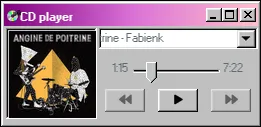
I’ve added a “song of the week” section to the site! The current “song du semaine” is playable using the music player widget right on the front page.
Songs are stored as blog posts so they’ll also be appearing in the chronological feed under their own category, and you can see the full list by clicking “Songs du Semaine” in the navbar.
I have zero intention of updating this exactly once a week. I may even add new songs more than once a week! Any time I get really into a particular track and want to share it with people I’ll post about it here. I’ve backdated some songs of the year so far to get things started.
The music player
I spent a while mulling over how best to embed audio on here without violating copyright law. Many Neocities folks reccommend using something like catbox.moe to host the MP3s, but 1) that just offloads liability to a third party and 2) I can do better than that for hosting if they’re my own files. Ideally, I wanted to stream the audio from something like Spotify, but those embedded music players don’t let you play much of the track before prompting you to go to their platform to hear the rest. Then, I found this 2013 LiveJournal post from jheaton that gave me my answer: YouTube.
YouTube’s embedded player UI has changed a lot since 2013 so the exact approach there (of hiding everything except the controls) wasn’t going to work. Luckily, YouTube provides an API for interacting with their embedded players for the purposes of controlling them from your own site. My plan was now to add a custom music player component to the page (I stole the Windows 98 one from this library of music players) and then wire that up to a hidden YouTube video which would play the music. This ended up being the final approach, but it was easier said than done.
My first approach was to just copy-paste that whole music player file into a .astro component, but Astro didn’t want to play nice with the YouTube API. In its raw form, YouTube wants you to embed their script, and then create callbacks that the script calls out to on your page, and it finds your scripts by name. By default, Astro does a bunch of magic to scripts to namespace and deduplicate them, so the functions running on the page do not have the names you wrote them with. You can tell it to add the scripts verbatim with the flag is:inline, but that somehow broke the embedding of the video ID from the back-end code into the front-end script (even though the docs say define:vars implies is:inline?). So, I gave up and reached for React. I pulled in react-youtube (which just wraps the YouTube API in a React component) and after that it was pretty straightforward.
I won’t put the entire directory worth of code here because it’s just too much, but here’s what the main React component ended up looking like. If anybody wants the rest, DM me on Bluesky and I’ll put it on GitLab or something.
import { useRef, useState, type ReactElement } from 'react'import YouTube, {  type YouTubeProps,  type YouTubePlayer as YouTubePlayerIframe,  type YouTubeEvent,} from 'react-youtube'import cx from 'classnames'import { MusicPlayer } from './MusicPlayer'
interface YoutubePlayerProps {  className?: string  songTitle: string  videoId: string  albumArt: {    src: string    alt: string  }}/** * Component that wraps a hidden YouTube iframe to play audio * https://developers.google.com/youtube/iframe_api_reference * https://www.npmjs.com/package/react-youtube */export const YouTubePlayer = ({  className,  videoId,  songTitle,  albumArt,}: YoutubePlayerProps): ReactElement => {  const [isVideoHidden, setIsVideoHidden] = useState<boolean>(true)  const [isClosed, setIsClosed] = useState<boolean>(false)  const [isPlaying, setIsPlaying] = useState<boolean>(false)  const [duration, setDuration] = useState<number>(0)  const [progress, setProgress] = useState<number>(0)
  const playerRef = useRef<YouTubePlayerIframe | null>(null)
  const onPlayerReady: YouTubeProps['onReady'] = async (event) => {    console.log('YouTube player ready')    playerRef.current = event.target
    const videoDuration = await playerRef.current.getDuration()    setDuration(videoDuration)  }
  const onTogglePlay = () => {    if (playerRef.current) {      if (isPlaying) {        playerRef.current.pauseVideo()      } else {        playerRef.current.playVideo()      }
      setIsPlaying((prev) => !prev)    }  }
  const onSeek = async (newTime: number) => {    if (playerRef.current) {      playerRef.current.seekTo(newTime, true)    }  }
  const onYouTubeStateChanged = async (event: YouTubeEvent<number>) => {    if (event.data === 1) {      setIsPlaying(true)
      const currentTime = await event.target.getCurrentTime()      setProgress(currentTime)    } else if (event.data === 2) {      setIsPlaying(false)    }  }
  if (isClosed) {    return <span className={cx(className)}>{':('}</span>  }
  return (    <div className={cx(className)}>      <MusicPlayer        className="mx-auto"        isReady={!!playerRef.current}        duration={duration}        displayedProgress={progress}        setDisplayedProgress={setProgress}        songTitle={songTitle}        albumArt={albumArt}        seekTo={onSeek}        playPauseTrack={onTogglePlay}        isPlaying={isPlaying}        onMaximizeVideo={() => setIsVideoHidden(false)}        onMinimizeVideo={() => setIsVideoHidden(true)}        onClose={() => setIsClosed(true)}      />      <div className={cx({ hidden: isVideoHidden })}>        <YouTube          videoId={videoId}          title={songTitle}          onReady={onPlayerReady}          onStateChange={onYouTubeStateChanged}          className="mt-2 w-full aspect-video"          iframeClassName="w-full aspect-video"        />      </div>    </div>  )}